Version Control for AI Agent Context: Taking Multi-Agent Systems to Production
March 28, 2026Ollie @puppyone
By puppyone Team — the team building puppyone and Mut.
When you move from a single "helpful agent" to a production multi-agent system, you stop asking: Can the agent do the task? and start asking: Can the system stay correct tomorrow?
That's where version control for AI agent context becomes a production requirement, not a nice-to-have.
In pilots, teams often keep shared context in Git, a shared folder, or a blob store with a few sync scripts. It works until multiple agents start writing to the same context—prompts, policies, tool configs, runbooks, and memory artifacts.
Then the failures look like operations, not prompting: behavior changes without change control, unclear ownership of edits, and no safe rollback.
Key Takeaway: In production, the hardest part isn't generating outputs—it's keeping shared context consistent, scoped, auditable, and reversible as many agents read and write in parallel.
Why Shared Context Becomes a Production Problem
"Context" isn't just prompts. In real deployments it usually includes:
- System instructions and policies — what the agent is allowed to do
- Tool configuration — which tools exist, credentials/aliases, rate limits
- Runbooks and playbooks — how to handle edge cases
- Memory artifacts — facts, decisions, customer state stored as files
- Intermediate outputs — drafts, analyses, partial plans
All of these are operationally sensitive. Change them and you change system behavior.
Two dynamics make this uniquely painful in multi-agent setups:
- Write amplification: agents produce lots of small edits—sometimes as a side effect of doing work.
- Tight coupling through shared files: what one agent writes becomes another agent's "truth" on the next run.
The result is what incident response teams hate most: failures you can't reproduce quickly.
Why Git, Shared Folders, and DIY Sync Break Down
Git assumes humans will resolve conflicts
Git's merge model works when conflicts are rare and a person is present to fix them. But merge conflicts are not edge cases in multi-agent context.
A conflict is simply when Git can't automatically combine changes (two branches edit the same lines), so it stops and asks for manual resolution. That's sane for engineers. It's a dead end for unattended agents.
If "push" can fail, you end up building a conflict-handling layer (detection, resolution, retries). Now version control becomes a reliability bottleneck.
Shared folders make concurrency invisible
Shared folders (S3 buckets, network drives, GDrive-like systems) generally don't solve:
- atomicity — did you read a consistent snapshot?
- ordering — which write should win?
- auditing — who changed this file, and why?
- rollback — how do you undo a bad change safely?
Without strong semantics, you get "last writer wins" behavior—which is a polite way of saying silent data loss.
DIY sync scripts accumulate operational debt
Teams often start with a cron job to pull shared context, a script to push agent outputs, and a naming convention to avoid collisions. This works until the system evolves: agents are added, permissions diverge by role, some files become sensitive, and you need to ship hotfixes and roll them back.
At that point, you've reinvented a version control system—without the hard parts solved.
⚠️ Warning: The worst multi-agent failures aren't "bad answers." They're policy/config changes that quietly ship to production with no traceability, then take days to unwind.
What "Version Control for Context" Means in the Agent Era
A useful definition: Version control for context is the ability to manage the full lifecycle of agent-readable and agent-writable files—history, diff, rollback, access boundaries, and concurrency—under production constraints.
For production teams, the requirements look like this:
- Centralized context for multi-agent systems — one canonical state, not many partial copies.
- Per-agent access control for shared workspaces — each agent sees and writes only what it is allowed to.
- Concurrent writes with predictable merges — agents can push changes without a human resolving conflicts.
- Audit trail for agent context changes — you can answer "what changed, when, and by which agent?"
- Rollback for AI agent file changes — you can revert quickly when context updates degrade behavior.
This aligns with broader engineering guidance that treats context as an operational input. Anthropic's engineering team frames context as a finite resource and a discipline in Effective Context Engineering for AI Agents—reliability comes from managing what the system knows as carefully as what the system runs.
Introducing Mut: Version Control Built for Multi-Agent Collaboration
Mut is a system purpose-built for multi-agent context version control. It starts from a different assumption: the primary "contributors" are agents that need to collaborate safely without human conflict resolution.
At a high level, Mut gives you:
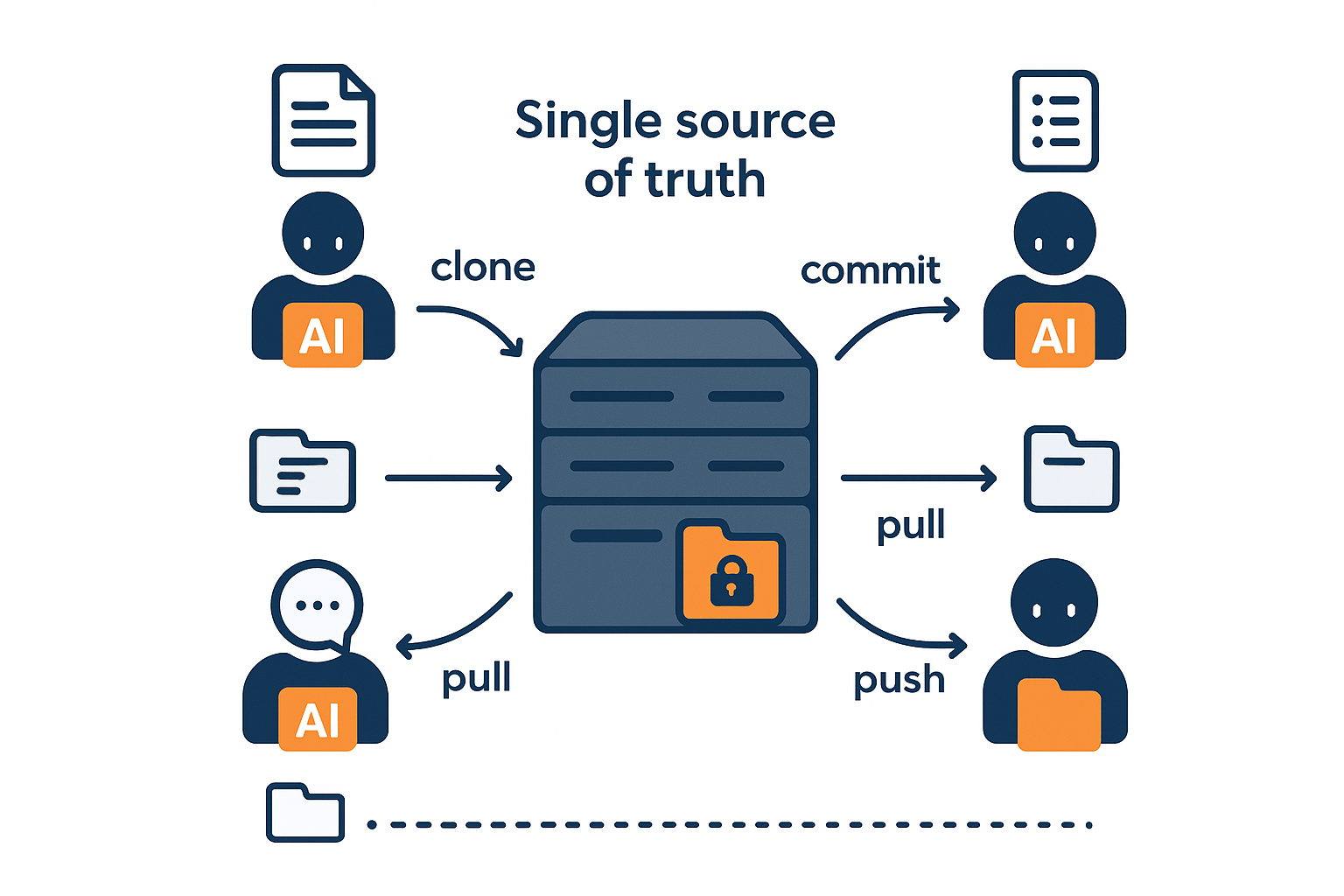
- A centralized server as the single source of truth
- An agent-side client supporting clone/commit/push/pull workflows
- Per-agent scopes so each agent only touches permitted paths
- Automatic server-side merges so pushes don't fail like Git conflicts
- Operational workflows you need in production: history, diff, log, checkout, local status, rollback
Mut Architecture
1) Central server as a single source of truth
Every agent reasons about one current state. Audit and rollback are anchored to a single history. You avoid "split brain" where two agents both believe they have the latest context.
2) Client on each agent machine
Agents use a client to interact with context: clone a working copy, commit local changes, push changes to the server, pull updates. This gives developer-friendly ergonomics of local work without forcing a human collaboration model.
3) Per-agent scopes
Mut supports per-agent scopes, meaning an agent only sees and writes paths it is permitted to access. In practice, scoped permissions let you separate:
- Customer-facing knowledge from internal ops docs
- Read-only policy files from writable memory files
- Sensitive paths (secrets, legal docs) from general project context
4) Automatic server-side merge
What auto-merge covers well:
- Non-overlapping edits: if two agents change different files or different regions of the same file, the server combines both changes.
- Ordering and traceability: merges are applied against a canonical history so you can inspect what landed, in what order, and from which agent.
What it does not magically guarantee:
- Semantic correctness: a merged file can still be "wrong" in the business sense.
- Truly overlapping edits: when two agents edit the same line or atomic config value, a real conflict still exists and must be handled by an explicit policy.
How real conflicts are handled: When edits overlap, the server applies a deterministic conflict policy so the project state doesn't become "stuck" on push. The full audit trail and diff remain available. If the merged result causes a regression, you can roll back to a known-good version quickly.
The key operational point: push does not fail the way Git pushes fail due to conflicts. Instead of building a "conflict handler" workflow, you can treat "push" as a reliable commit to the shared context.
Concrete Example: Two Agents, One Project, Scoped Access
Consider a production workflow with two agents working on the same product onboarding system:
/policies/          — governance rules, escalation criteria
/customer_playbooks/ — public-facing answers and onboarding steps
/internal_analysis/  — incident notes, root cause analyses
/memory/            — structured state updated as the system runs
Agent 1 — Customer-facing agent: answers onboarding questions, drafts customer-facing instructions.
Agent 2 — Internal analysis agent: reads logs/feedback, updates incident notes, proposes policy tweaks.
Without scopes
If both agents have full access, you get predictable risk:
- The customer-facing agent can accidentally read internal incident notes and incorporate them into an external message.
- The analysis agent can accidentally change customer-facing playbooks while experimenting.
With scoped access
Customer-facing agent:   READ /customer_playbooks/, /policies/
                         WRITE /memory/customer_state/

Internal analysis agent: READ everything
                         WRITE /internal_analysis/, /policies/ (within permitted paths)
Now safe context sharing is structural—not a convention, but an enforced boundary.
Key Production Benefits
Reduced context drift
With versioned context and centralized history, you can answer quickly:
- What changed?
- Who changed it?
- Can we revert it safely?
No failed pushes due to merge conflicts
If your agents produce frequent changes, Git's failure mode is blocking. Mut moves the concurrency problem to the server.
Rollback and auditability when something regresses
- rollback to a known good context state
- diff to understand what changed
- log/history to understand when it changed
- checkout to reproduce a past context state for debugging
Comparison: Mut vs Git vs Shared Folders vs Ad Hoc Scripts
| Requirement | Mut | Git | Shared folders | Ad hoc sync |
|---|---|---|---|---|
| Single source of truth | ✅ central server | ❌ distributed clones | ❌ often unclear | ❌ easy to drift |
| Scoped agent access (path-level) | ✅ per-agent scopes | ❌ typically repo-level | ❌ usually coarse | ❌ custom & brittle |
| Concurrent writes without human conflict resolution | ✅ server auto-merge | ❌ manual required | ❌ last-writer-wins | ⚠️ you own it |
| Rollback + history + diff | ✅ | ✅ | ❌ rarely complete | ❌ usually incomplete |
| Designed for AI agents | ✅ | ❌ | ❌ | ❌ |
Two Real-World Regression Stories
1) A "small" policy edit changed escalation behavior
An agent updated a shared policy file used for escalation routing. Support behavior shifted unexpectedly: escalation thresholds and response phrasing diverged from the last known-good state.
A QA review flagged the regression. We confirmed the exact change by inspecting version history, rolled the policy file back, then reapplied the intended change in a narrower scope.
Time to recovery: ~10–20 minutes.
2) Two agents edited adjacent shared config and caused a mismatch
Two agents updated the same shared config area in close succession. The resulting context mismatch caused downstream behavior to drift.
Monitoring surfaced behavior anomalies. Audit records helped pinpoint which version introduced the change. We rolled back to the last stable version, then reapplied with tighter scope isolation.
Time to recovery: ~15–30 minutes.
When to Adopt Mut
Mut is most relevant when you hit one or more of these conditions:
- You have multiple agents writing to the same project context (not just reading).
- You need per-agent access boundaries for safety or compliance.
- You've had an incident where a context change caused a regression and you lacked a clean rollback.
- You're spending real engineering time on merge/conflict handling, file locking, or sync logic.
- You're scaling from a "single workflow owner" to teams where multiple agents operate continuously.
A Simple Self-Assessment
Can you answer all of these in under five minutes?
- What did Agent X change yesterday?
- Which context version was active when an incident started?
- Can you roll back to a known-good context state quickly?
- Are agents prevented (not just discouraged) from reading/writing out-of-scope paths?
- Can two agents push updates in parallel without a human resolving conflicts?
If the answer is "not reliably," you don't just need better prompts. You need version control for AI agent context.
FAQ
What should be version-controlled in an AI agent system?
At minimum, version-control any files that can change agent behavior: system prompts, policy/config files, tool routing rules, runbooks, and any shared memory artifacts that agents update over time.
Why is Git a risky default for multi-agent context?
Git's core failure mode for parallel edits is the merge conflict: when two contributors touch the same lines, Git requires manual resolution. That's manageable for humans, but becomes an operational bottleneck for unattended agents.
How does per-agent access control reduce production risk?
It shrinks blast radius. When each agent can only read/write specific paths, you reduce accidental data exposure and prevent unintended edits to critical files like policies and shared configurations.
If you're building multi-agent workflows and want a merge-safe, scoped approach to context changes, take a look at Mut's workflow for cloning, committing, and rolling back shared agent context.