
Ultimate Guide: OpenClaw Enterprise Governance
March 25, 2026Ollie @puppyone
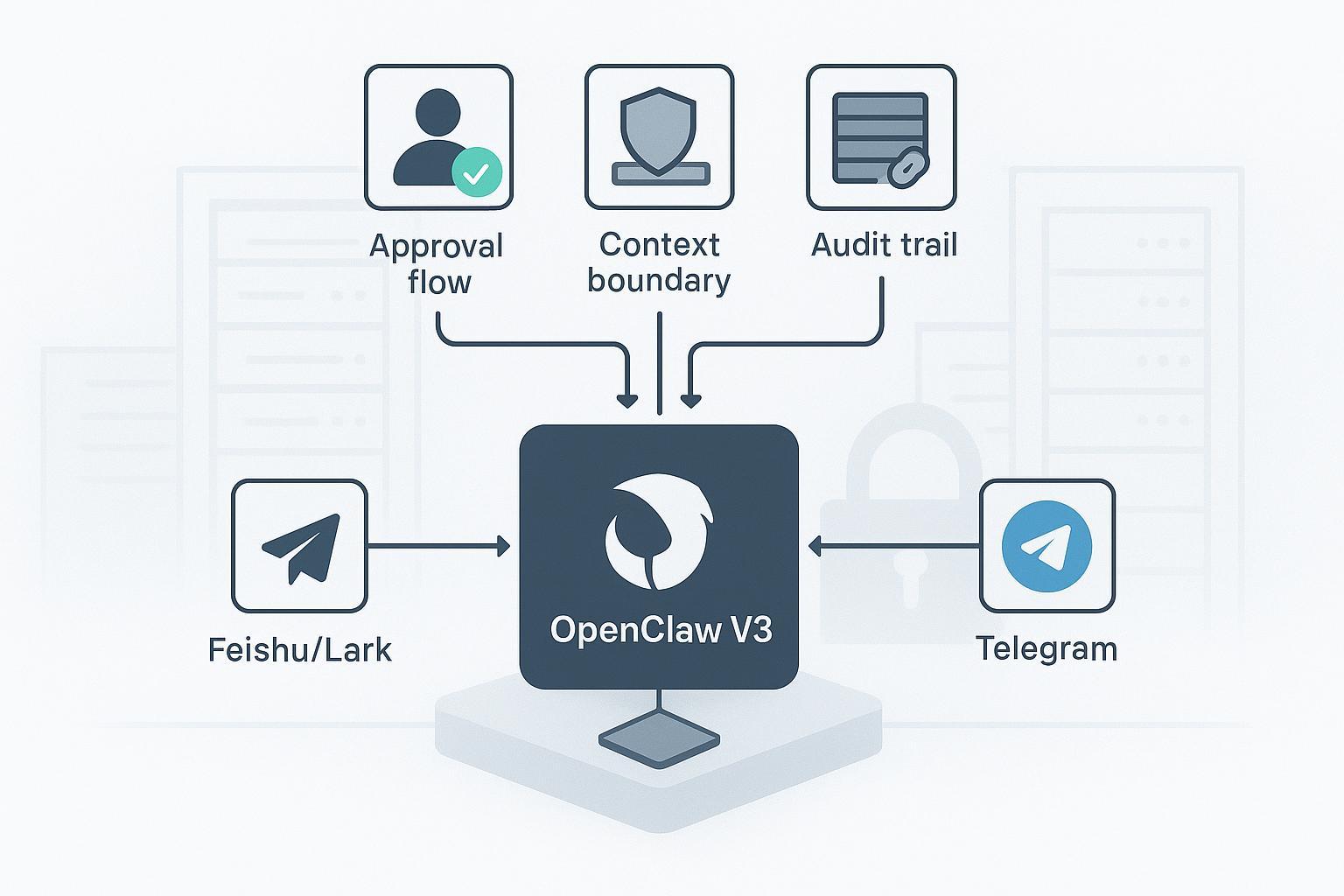
If you’re bringing OpenClaw V3 into Feishu/Lark or Telegram, the hardest part isn’t getting the bot to reply—it’s proving to your security and compliance teams that the agent operates within safe context boundaries, high‑risk actions require explicit human approval, and every sensitive read/write is auditable. This guide is your governance playbook: concrete patterns, minimal assumptions, and verifiable steps to deploy messaging agents that hold up to enterprise scrutiny.
Key takeaways
- Treat OpenClaw enterprise governance as a first-class concern: scope each agent’s context, minimize tool permissions, and require approvals for risky actions.
- On Feishu/Lark, enable long-connection event handling and filter by @mentions; on Telegram, keep Privacy Mode on and scope commands per chat/admin.
- Design a stateful approval flow for send/post/modify/exfiltrate actions and record both the request and the decision in an audit log.
- Standardize your audit schema and ship it to SIEM via Elastic Agent/Filebeat or Splunk HEC; routinely test that evidence is reconstructable.
- Verify guardrails with parity tests in DMs and groups before rollout; monitor spikes in pairing requests, failed approvals, and rate-limit errors.
Why governance‑first for messaging agents
Messaging agents sit where employees live all day—group chats, DMs, and shared files. Without guardrails, a single prompt can pull sensitive context into the wrong channel, or trigger tools that act beyond policy. A governance‑first stance aligns OpenClaw with industry controls: least privilege, explicit approvals, and durable audit.
According to NIST SP 800‑53 Rev. 5, AC‑6 calls for least privilege and AU‑* controls require organizations to generate, protect, and review security‑relevant audit records. These map directly to agent scoping, action approvals, and log export for incident response. See the official catalog in NIST’s SP 800‑53 Rev. 5 for AC‑6 and AU controls published by NIST (2020, current as of 2026), in the document titled Special Publication 800‑53 Revision 5. You can consult the authoritative guidance in the NIST SP 800‑53 Rev. 5 PDF to ground your policy design: https://nvlpubs.nist.gov/nistpubs/SpecialPublications/NIST.SP.800-53r5.pdf
Risk and control quickly come into focus:
| Risk in messaging agents | Governance control you can implement |
|---|---|
| Context leakage across channels | Per‑channel agents with scoped memory; require @mention/command to trigger; deny cross‑channel retrievals by default |
| Destructive or exfiltration actions | Human‑in‑the‑loop approvals for send/post/modify/download; short‑lived tokens for actuation tools |
| Supply‑chain risk in skills | Signed/verified packages; registry allowlists; sandbox shells; deny‑by‑default tools |
| Weak accountability | Append‑only audit logs with request/decision pairs; SIEM export; periodic review routines |
Architecture patterns that scale in enterprises
Think in layers. Here’s a pragmatic reference pattern for OpenClaw enterprise governance that balances local control with observable operations:
- Local‑first kernel: Run the OpenClaw kernel in a containerized, non‑root context on your own infrastructure. Keep the web UI behind VPN/SSO. Limit filesystem mounts to a read‑only root and explicit write volumes.
- Per‑channel agents and scoped memory: Use distinct agent instances for Feishu/Lark vs. Telegram. Keep memory and retrieval scopes bound to the channel and team; avoid a single shared memory across all channels.
- Deny‑by‑default tools: Start with a tight allowlist (e.g., read_file, structured retrieval, safe web fetch). Gate risky verbs (execute_command, send_email, external_post) behind approvals.
- Approval broker: Implement an approval state machine (requested → triaged → approved/denied) that stores approver identity, decision timestamp, and rationale. Surface approval prompts where approvers already work (Feishu cards or Telegram inline flows), but keep the decision trail in your audit log.
- Observability: Emit JSON logs for security‑relevant events and forward to a central SIEM. Track rates for pairing requests, approvals, denials, tool execs, and outbound posts.
Feishu/Lark hardening in practice
Feishu’s developer platform provides the channel‑side primitives you need—enterprise internal apps, scoped permissions, long connections, and message events. Follow Feishu’s official event subscription overview to create an app, assign only the minimal chat/message scopes you need, enable long‑connection event subscription, and subscribe to im.message.receive_v1. Consult Feishu’s Event Subscription Guide overview: https://open.feishu.cn/document/server-docs/event-subscription-guide/overview and the message events reference including common error codes: https://open.feishu.cn/document/ukTMukTMukTM/ugjM14COyUjL4ITN
Governance patterns to apply with OpenClaw on the Feishu side:
- Require @mention in groups: In your message handler, process only events where the bot is mentioned; ignore ambient chatter. This mirrors “require‑mention” behavior and dramatically reduces prompt‑injection risk in busy channels.
- Pairing before DMs: On first DM, generate a pairing code and require administrator approval before conversing. Log pairing.requested and pairing.approved with user and tenant identifiers.
- Approved‑group allowlist: Maintain a list of permitted group IDs; reject events from other chats. Review the list monthly.
- Rate limits and backoff: Respect Feishu’s platform limits. Alert on repeated throttling or delivery errors and back off with jitter.
- Least‑privilege scopes: Start with only IM read/send and membership read; add more only when a concrete use case requires it. Document each scope with the reason it exists.
Reference Feishu’s “preparations before development” page for SDK setup and app creation steps if you need a canonical checklist published by Feishu: https://open.feishu.cn/document/server-side-sdk/nodejs-sdk/preparation-before-development
Telegram hardening in practice
Telegram provides crisp governance‑relevant switches in its Bot API:
- Enable Privacy Mode: With privacy on, your bot receives only commands and mentions in groups—ideal for least privilege. Configure with @BotFather using /setprivacy. See Telegram’s Privacy Mode and features documentation: https://core.telegram.org/bots/features#privacy-mode
- Minimize admin rights: Promote the bot only with rights it truly needs (e.g., no can_delete_messages unless required). Administrator rights are defined in the Telegram Bot API under ChatAdministratorRights: https://core.telegram.org/bots/api
- Scope commands: Use setMyCommands with BotCommandScope* to expose only relevant commands by chat or admins. That API surface is documented under setMyCommands and command scopes in the Telegram Bot API: https://core.telegram.org/bots/api
- Respect rate limits: Back off on 429s and watch for bursts (rough guide: ~1 msg/sec per chat, ~30/sec overall—always defer to current Telegram docs). The limits and request guidance live in the same Bot API reference: https://core.telegram.org/bots/api
Combine these with OpenClaw’s per‑channel scoping and you get strong baselines for OpenClaw enterprise governance on Telegram.
Approval flows for risky actions
Not every action needs approval. But for messages that send externally, modify shared resources, or exfiltrate files, require human sign‑off.
Define a small, explicit set of risky verbs and gate them behind a stateful approval process. Treat the flow and the evidence equally seriously.
Example approval‑flow policy (pattern; adapt key names to your implementation):
approvals:
  verbs:
    - send_message_external
    - post_to_group
    - modify_shared_doc
    - export_file
  routing:
    by_channel:
      feishu: security-approvers
      telegram: platform-approvers
  sla:
    pending_timeout: 30m
    auto_deny_after: 8h
  record:
    include:
      - requester_id
      - approver_id
      - reason
      - decision
      - decided_at
Implementation notes
- Surface the approval prompt in-channel (Feishu interactive card; Telegram inline keyboard) but finalize in a backend broker that writes a durable record.
- Every request emits tool.exec.requested with a generated approval.request_id; every decision emits tool.exec.approved or tool.exec.denied with the same ID.
- If the approval SLA expires, auto‑deny and notify the requester with a rationale.
Minimal audit events (JSON pattern):
{
  "@timestamp": "2026-03-09T10:12:34.567Z",
  "event.dataset": "openclaw.audit",
  "event.action": "tool.exec.requested",
  "channel.type": "feishu",
  "chat.id": "oc_abcdef",
  "user.id": "u_feishu_123",
  "agent.id": "agent_feishu_ops",
  "tool.name": "post_to_group",
  "approval.request_id": "apr_9f3a",
  "outcome": "pending"
}
Audit logging and SIEM export
Your OpenClaw enterprise governance story is only as strong as your evidence. Standardize fields and ship logs to a system your security team already trusts.
Suggested minimal schema (ECS‑like; adapt to your stack):
- event.dataset = "openclaw.audit"
- event.action = message.received | message.sent | tool.exec.requested | tool.exec.approved | retrieval.requested | retrieval.permitted | retrieval.denied
- user.id, channel.type, chat.id, message.id
- agent.id, skill.id, tool.name
- approval.request_id, approval.actor_id, approval.state
- context.collection, context.version_id
- outcome, error.code, error.message
Elastic route (two common options)
- Elastic Agent “Custom Logs” integration for JSON; map to ECS where possible. Elastic’s SIEM field and object schemas documentation describes ECS‑compatible fields and integrations from Elastic (2025–2026): https://www.elastic.co/docs/reference/security/fields-and-object-schemas/siem-field-reference
- Filebeat if Agent isn’t feasible. Follow the Filebeat installation and configuration quick start from Elastic: https://www.elastic.co/guide/en/beats/filebeat/8.19/filebeat-installation-configuration.html
Splunk route (HEC)
- Enable HTTPS HEC and send JSON events to /services/collector or /services/collector/event with Authorization: Splunk and a sourcetype like _json. Splunk’s HTTP Event Collector examples and formatting guidance provide the canonical details: https://help.splunk.com/splunk-enterprise/get-started/get-data-in/9.1/get-data-with-http-event-collector/http-event-collector-examples and https://help.splunk.com/en/data-management/get-data-in/get-data-into-splunk-enterprise/9.4/get-data-with-http-event-collector/format-events-for-http-event-collector
Verification tip: Build a saved search for “approval.request_id AND event.action:tool.exec.*” and review weekly for outliers.
Practical workflow: auditable context boundary using puppyone
When you need a governed context source with end‑to‑end audit trails for context access, you can connect OpenClaw to a context base that preserves permissions and lineage across agents.
Example (neutral, reproducible pattern)
- Define a policy‑bound collection (e.g., projects/sales‑notes) in a governed context base. Expose it to OpenClaw via MCP endpoint, and bind it to your Feishu agent only.
- For any cross‑collection retrieval request, require an approval and emit retrieval.requested with context.collection and context.version_id. Only on approval should retrieval.permitted be logged and the data returned.
- Keep logs append‑only and export to SIEM with the schema above so incident responders can reconstruct who accessed what and when.
If you’re evaluating a context base purpose‑built for agents, puppyone supports this workflow and documents hybrid indexing and permissions patterns. See the overview on the puppyone homepage for distribution options (MCP/API/Claude Skills): https://www.puppyone.ai and, for background on hybrid indexing and structured Know‑How, the Ultimate Guide to Agent Context Base: Hybrid Indexing on puppyone’s blog: https://www.puppyone.ai/en/blog/ultimate-guide-to-agent-context-base-hybrid-indexing
Note: Keep this pattern vendor‑neutral in your implementation notes; the key is having a single governed source with deterministic retrieval boundaries and auditable access, regardless of the specific product.
OpenClaw enterprise governance runbook
Day‑0 (before first user)
- Lock down the kernel: container non‑root, read‑only root FS, explicit writable volumes, web UI behind VPN/SSO.
- Secrets: load via env/SecretRef, never commit plaintext keys; rotate test keys after smoke tests.
- Channels: Feishu app created with minimal scopes and long‑connection configured; Telegram bot with Privacy Mode enabled and no excess admin rights.
- Logs: JSON logger enabled; forwarders to Elastic Agent/Filebeat or Splunk HEC tested.
Day‑1 (pilot users)
- Enable pairing for DMs; approve only pilot users. Maintain an approved group allowlist.
- Turn on approval flow for risky verbs; verify request/decision events arrive in SIEM with matching approval.request_id.
- Add alerts for spikes in pairing requests, failed approvals, and rate‑limit errors.
Day‑30 (steady state)
- Access review: export last 30 days of pairing approvals and group allowlist; remove stale users/chats.
- Rotation: rotate Feishu/Telegram tokens and any MCP/API keys; validate rollout with canary tests.
- Patch: update container base images and dependencies; re‑run smoke tests and a parity test matrix across channels.
Troubleshooting and verification
- Bot replies in TUI but not in Feishu/Telegram: confirm channel credentials, long‑connection status (Feishu), or privacy/command scope (Telegram). Review recent error codes in platform logs and your SIEM.
- Group @mentions ignored: ensure your handler checks mention flags (Feishu) or relies on privacy mode + /commands (Telegram). Reproduce with a minimal command that doesn’t call tools.
- Approvals stuck in pending: check the broker’s webhook/queue health; enforce pending_timeout and notify requesters on auto‑deny. Confirm that tool.exec.approved/denied events use the exact approval.request_id.
- Audit gaps: temporarily tee logs to a local file and SIEM; compare counts by event.action daily until parity is proven.
What to do next
- Harden one channel at a time. Start with Feishu/Lark: stand up an internal app, wire long‑connection events, and prove your @mention and pairing patterns in a private space using Feishu’s event subscription documentation as your authoritative reference: https://open.feishu.cn/document/server-docs/event-subscription-guide/overview
- Turn on your approval broker and ship audit logs to SIEM. Validate that every request has a matching decision event and that both carry the same approval.request_id.
- If you need a governed, auditable context source that you can expose to multiple agent entry points without duplicating permissions, you can evaluate puppyone for this role; its overview and background materials are linked above, and the approach remains compatible with the patterns in this guide.
FAQs
Q1: What is the minimum set of controls for OpenClaw in Feishu or Telegram?
A: At minimum: per-channel agent scoping, @mention/command-only triggers, deny-by-default tools, and an approval broker for risky actions (send/post/modify/exfiltrate). Add append-only audit logs and SIEM export for accountability.
Q2: How do I handle approvals when approvers are in different time zones?
A: Use short-lived approval windows (e.g., 24–48 hours) with clear expiry; auto-deny on timeout and notify the requester. Surface approval prompts in Feishu cards or Telegram inline flows so approvers can act from their usual workspace. Log both request and decision with timestamps for audit.
Q3: Can I run OpenClaw in Feishu and Telegram with a single shared agent?
A: Not recommended. Use distinct agent instances per channel (Feishu vs. Telegram) with scoped memory and retrieval. A single shared agent increases context-leakage risk and complicates governance; per-channel agents keep boundaries clear and simplify audit attribution.